
Sand.ai MAGI-2 · 1080p · native sound
MAGI 2 AI Video Generator 30 seconds, with sound
Describe a scene, start from a first frame or add up to 10 reference images. MAGI 2 renders it in 1080p at 25 fps with lip-synced dialogue, sound effects and music, and cuts where your prompt says.
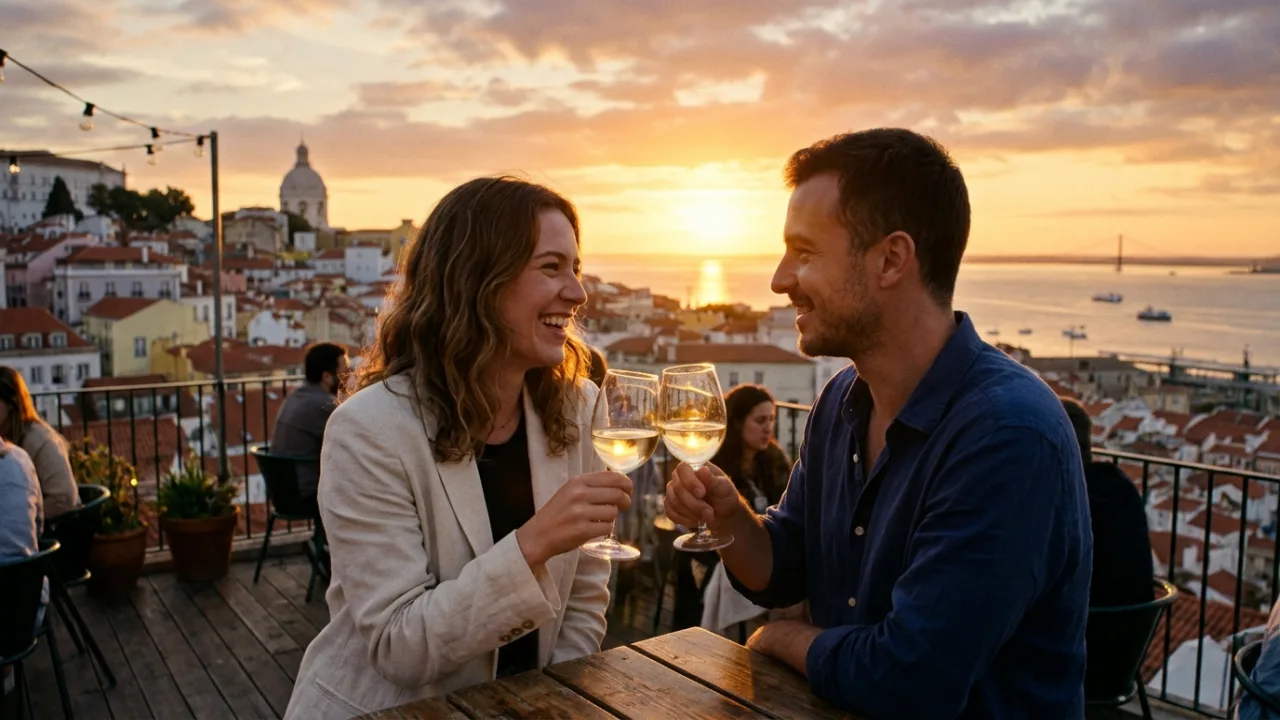
Storyboard · Lisbon rooftop scene
By continuing you confirm any people in your images agreed to it. Terms
- 3 credits ≈ $2.10
- 1080p at 25 fps
- Failed renders are refunded
Scene previews
MAGI 2 AI scenes you can direct in one take
Storyboard setups for 1080p widescreen video with dialogue, foley and score. Click Try prompt on any scene to load it into the generator.
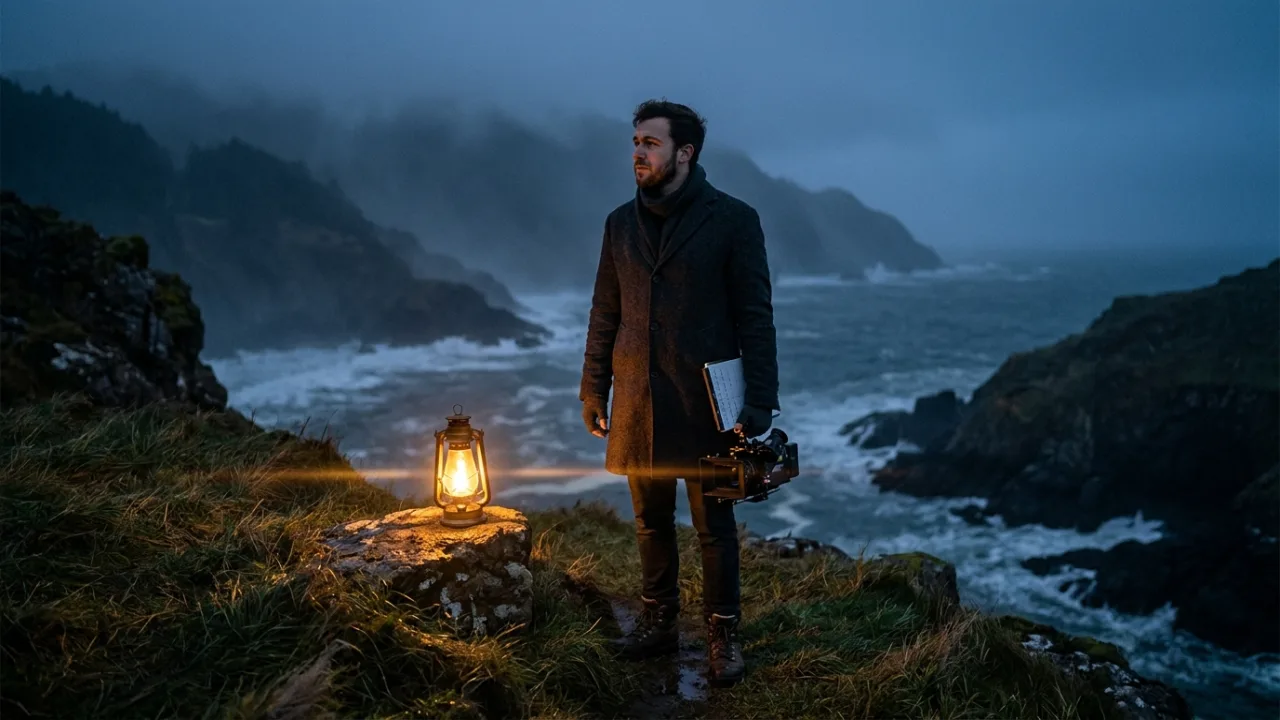
Atmospheric single take: blue-hour coastal cliff, warm tungsten lantern key light, ocean wind and distant surf. 
Commercial macro with foley sound: brass portafilter extraction, rising amber crema, steam hiss and cafe ambience.
What MAGI 2 does
What MAGI 2 can do in one take
MAGI 2 plans a whole scene at once, so the camera, the voices and the music land on the same beat.
30-second takes
Up to 30 seconds per video at 1080p and 25 fps. Long enough for a full exchange of dialogue or one unbroken camera move.
Sound in the same pass
Dialogue with matching lip movement, footsteps, rain and a score, generated with the picture instead of added afterwards.
First frame & 10 image refs
Lock faces, outfits, props and locations across cuts with a first frame or up to 10 reference images. Multi-modal video and audio refs are built into the model architecture.
Cuts you can direct
Write timestamps and shot sizes in your prompt to direct cuts on the beat. Leave them out and the model chooses its own coverage.
Widescreen, vertical & square
Render 16:9 for YouTube and film, 9:16 for TikTok and Reels, or 1:1 for feeds. Every frame shape renders in full 1080p at 25 fps.
Production-ready workflow
No mandatory subscription: buy credits that never expire, get automatic refunds on failed renders, and download clean 1080p MP4s with commercial rights.
Direct a scene
A 30-second MAGI 2 scene, beat by beat
This is how a timed prompt reads to the model: four shots, two lines of dialogue and the sound bed, all in one take.
Shots
Dialogue
Effects
Music
0:00 – 0:08
Wide dolly in
Slow push across a Lisbon rooftop bar at golden hour toward a woman waiting by the railing.
- 0:00
Shots
Wide dolly in
Slow push across a Lisbon rooftop bar at golden hour toward a woman waiting by the railing.
- 0:00
Effects
City ambience, tram bell
A distant tram bell under the opening shot.
- 0:08
Shots
Two-shot
Her friend arrives with two glasses of wine. Warm backlight, shallow depth of field.
- 0:09
Dialogue
"You actually came."
His line, lip-synced in the two-shot.
- 0:12
Effects
Glasses clink
Timed to the toast in the two-shot.
- 0:17
Shots
Close-up
Holding on her face as she answers, city lights blinking on behind her.
- 0:17
Music
Soft piano swells
Enters on the close-up and rises with the crane shot.
- 0:18
Dialogue
"Before the lights came on."
Her answer in the close-up: "I said I'd be here before the lights came on."
- 0:24
Shots
Crane up
The camera rises over the terracotta rooftops as the sun touches the river.
The full prompt
A 30-second single scene on a rooftop bar in Lisbon at golden hour, cinematic, warm backlight, shallow depth of field. 0:00 to 0:08: slow dolly in across the rooftop. A woman in her mid twenties in a cream linen blazer waits by the railing, the river glowing behind her. 0:08 to 0:17: medium two-shot. A man in his late twenties arrives with two glasses of white wine. He says, "You actually came." They clink glasses and laugh. 0:17 to 0:24: close-up on her as she answers, "I said I'd be here before the lights came on." City lights blink on behind her. 0:24 to 0:30: the camera cranes up over the terracotta rooftops as the sun touches the river. Sound: city ambience with a distant tram bell, the clink of glasses, soft piano that swells into the crane shot.
Click any beat on the timeline to inspect its cue, or load the full 30-second script straight into the generator above.
How to use MAGI 2
How to make a MAGI 2 AI video
- 01
Write the scene
Say who is in it, where it happens, what they say in quotes and what we hear. Add timestamps when you want cuts at exact moments.
- 02
Add images if you have them
Use one image as the first frame, or up to 10 references for faces, outfits and places. Leave it empty to start from text.
- 03
Pick the length and render
Choose 5 to 30 seconds, the frame shape and sound. The 1080p video lands in your library with its audio, ready to download.
MAGI 2 pricing
What a MAGI 2 video costs
You pay for seconds of 1080p video with sound: 3 credits for 5 seconds, 6 for 10, 18 for a full 30-second take. Packs start at $6.99 and never expire.
Pay once, no subscription
Or subscribe and save
What is MAGI 2
What is MAGI 2?
The MAGI 2 video model is the flagship release from Sand.ai (often searched as MAGI Sand AI), the lab behind MAGI-1. It turns text and reference images into a finished scene of up to 30 seconds in 1080p at 25 fps, rendering dialogue, sound effects and music together with the picture.
Under the hood it is a 480B-parameter model with 28B active at a time. It writes a scene from start to end as one piece instead of stitching short clips, which is why a long take keeps the same faces, the same light and the same room from the first second to the last.
- 1.
Made by Sand.ai
The team that open-sourced MAGI-1 in 2025.
- 2.
30 seconds, 1080p, 25 fps
From 4 to 30 seconds in a single generation.
- 3.
Native audio
Lip-synced speech, effects and score in the same pass.
- 4.
Open weights announced
The smaller MAGI-2 Preview is already public.
MAGI 2 vs Seedance and Kling
MAGI 2 compared with Seedance 2.0 and Kling 3.0
The three models people weigh most for video with sound. MAGI 2 leads on single-take length and reference capacity.
| Feature | MAGI 230s + sound | Seedance 2.0 | Kling 3.0 |
|---|---|---|---|
| Longest single video | 30 seconds | 15 seconds | 15 seconds |
| Sound generated with the video | Dialogue, effects, music | Dialogue, effects, music | Dialogue, effects, music |
| References in one shot | 20 (10 images, 5 videos, 5 audio) | 12 (9 images, 3 videos, 3 audio) | Images and elements |
| Multi-shot scenes | Timed cuts or automatic | Yes | Up to 6 shots |
| Open weights | Announced, Preview public | No | No |
FAQ
MAGI 2 questions, answered
Yes, your first video is free. Sign in with Google and MAGI 2 renders a 4-second 1080p clip with sound and a watermark. Unlock it or make more with a credit pack from $6.99.
MAGI 2 is made by Sand.ai, the lab that released the open MAGI-1 video model. The official API runs on Higgsfield, and this site renders every video through it.
Not yet. Sand.ai has announced open weights for the full MAGI-2. Today the public code is MAGI-2 Preview, in the SandAI-org repositories on GitHub and on Hugging Face. Running it yourself takes a cluster of data-center GPUs, so a hosted generator is the practical way to use MAGI 2.
MAGI-2 Preview is the smaller research release from August 2026: 114B parameters with 6B active, and 10-second clips. The full MAGI 2 has 480B parameters, renders up to 30 seconds and adds native sound and up to 20 references.
From 4 to 30 seconds in one generation, always in 1080p at 25 fps. Here you pick 5, 10, 15 or 30 seconds.
Yes. Put the lines in quotes and say who speaks them, and MAGI 2 generates the voice with matching lip movement, plus effects and music. Switch Sound off when you plan to add your own track.
$0.08 per second is the official API rate for developers. Here there is no API account or subscription to set up: a 5-second video is 3 credits, and the largest pack works out to $0.13 per second.
Yes. Videos you make here are yours to use in ads, client work and channels, as long as they follow our terms. Using reference images or audio to pass a video off as a real person is not allowed.
A few minutes, longer for a 30-second take. You can leave the page: the video stays in your library and we email you when it is ready.
Your first MAGI 2 scene is free
Write it, render it in 1080p with sound, and download it.